
Design & Layout Guidelines
Design & Layout Guidelines
Studio22 provides free software to help customers design their photo books, and we strongly recommend using it as it has been developed to guide users within safe layout parameters for printing and binding.
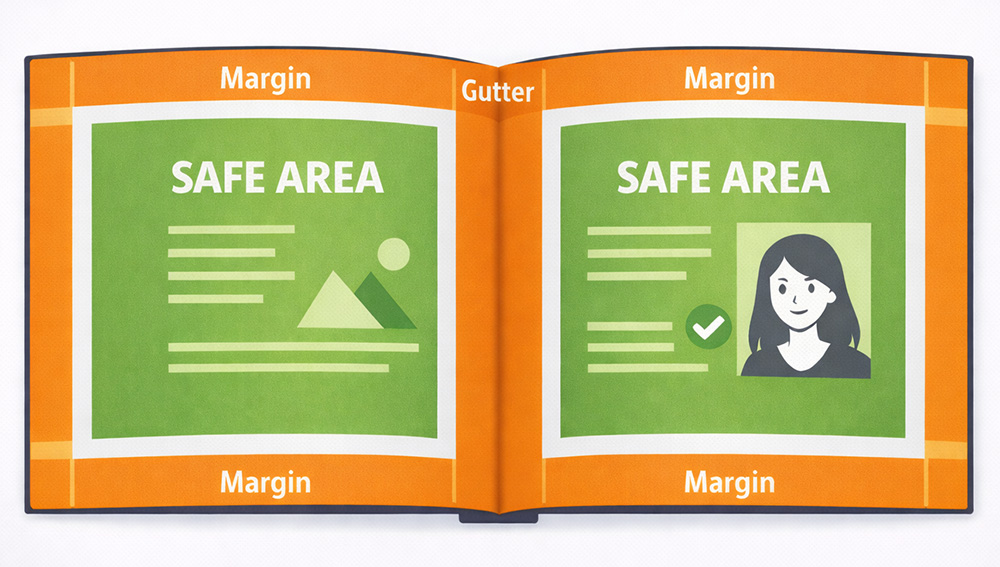
As the printers and binders of your book, we follow established international print and bookbinding standards. Designing for print involves technical considerations such as bleed, trim areas, margins, and gutter allowances to ensure that images and text appear correctly once the book is printed, trimmed, and bound.
Unless you have formal design training or have researched these print design principles, we strongly recommend that you err on the side of caution and avoid pushing text or images close to page edges or into the binding area. Keeping your design within safe margins will greatly reduce the risk of layout problems.
Files are printed exactly as submitted, and Studio22 does not adjust layouts or reposition elements to correct design issues. Any problems resulting from layout decisions remain the responsibility of the person submitting the design.
Safe Layout Recommendations
- Leave comfortable outer margins of 10-15mm.
Margins help prevent pages from appearing overcrowded and protect important content. - Do not place text or important image details in the gutter (the center fold of the book).
Elements placed too close to the spine may disappear into the binding. - Allow extra space near the gutter.
As a general guideline, the gutter margin should be roughly twice the size of the outer page margins to allow for the binding process.
If you are unsure how to correctly use bleed, margins, or gutter allowances, the safest approach is to keep all important content well within these recommended safe areas.
If you choose to Submit your own design, please follow the link for the File Submission Guidelines.